Call forwarding codes: set it up, check it, turn it off.
Forward calls when you don't pick up with **61*, set how long your phone rings first, check what's active with *#21#, and cancel everything with ##002#.
To forward calls you don’t answer, dial **61* followed by the number and a #. So: **61*15551234567#, then the call button.
To switch everything off again, dial ##002#. That one cancels every forwarding rule at once, including the ones you forgot about.
Those two codes solve most of it. The rest of this page is about the part that trips people up: there are four different forwards, and almost everyone turns on the wrong one.
Which of the four do you actually want?
| Code | When it forwards |
|---|---|
**21*number# | always — your phone doesn’t even ring |
**61*number# | when you don’t answer |
**67*number# | when you’re on another call |
**62*number# | when you’re unreachable (off, no signal, airplane mode) |
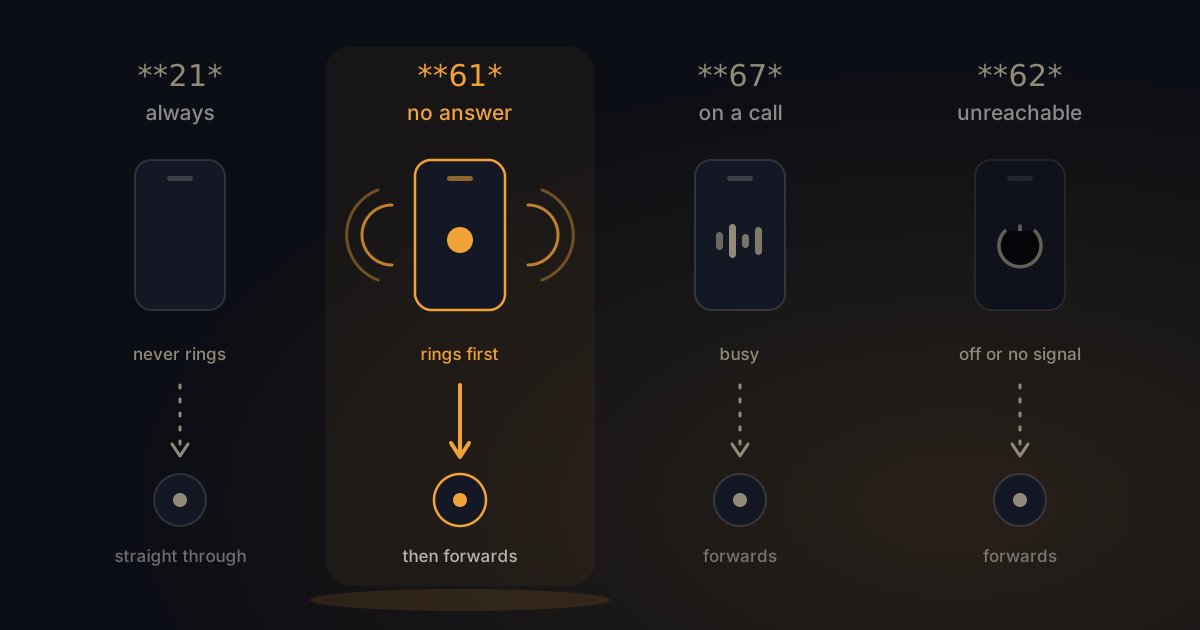
This is where it goes wrong. People want “if I don’t pick up, send it on” and they dial **21*, because that’s the code every guide puts first. Their phone then stops ringing entirely, and they assume something’s broken.
**21* is for the week you’re away. For everything else you want **61*.
You can stack them. Point **61*, **67* and **62* at the same number and you’ve covered everything except the calls you answer yourself — which is usually what people meant in the first place.
How long does your phone ring before it forwards?
This is the setting nobody mentions, and it’s the one that decides whether you get a chance to answer at all.
By default your phone rings somewhere between 15 and 20 seconds. Too short and you’re always just too late when your phone is in a coat pocket. Too long and the caller has already hung up.
You can set it yourself by adding the time to the end of the code:
**61*15551234567**20#Those last two digits are seconds. Your options are 5, 10, 15, 20, 25 or 30 — the network rejects anything else. One ring is roughly five seconds, so 20 seconds is about four rings.
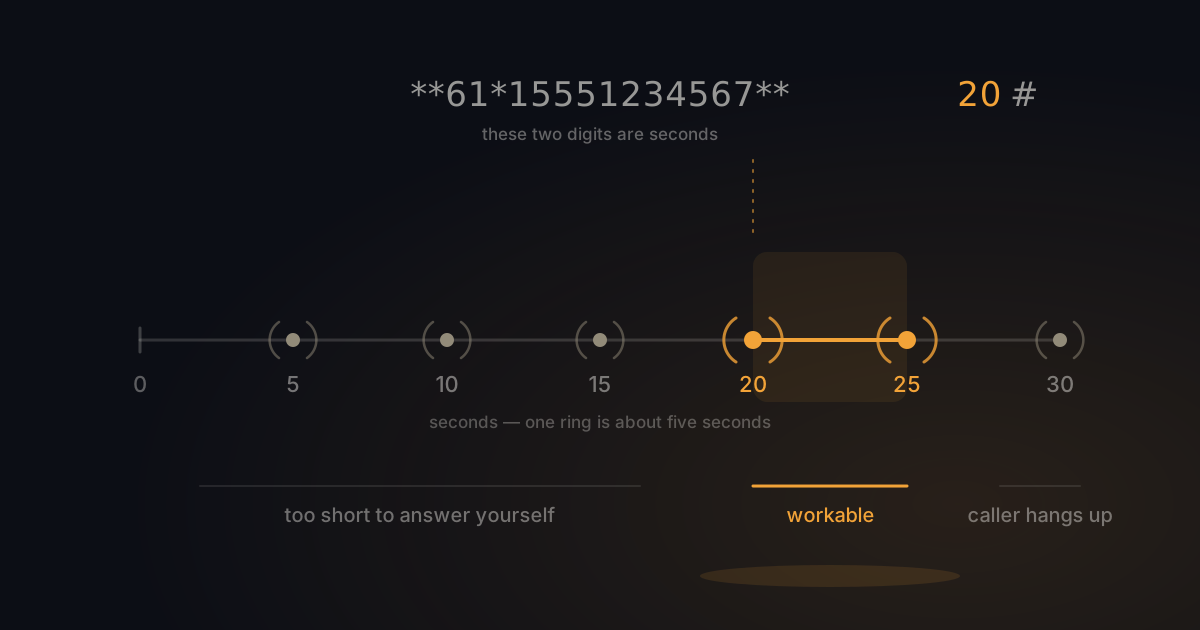
What works in practice: 20 to 25 seconds if you usually have your phone on you. Ten seconds if you know you’re not going to answer and you’d rather not keep the caller waiting.
How do you check what’s currently switched on?
If forwarding doesn’t seem to work, or won’t switch off, this is nearly always why: a different code is active than the one you think.
Every code has a status version. Dial it and you get an immediate readout:
*#21#— is “always forward” on, and to which number?*#61#— and when you don’t answer?*#62#— and when you’re unreachable?*#67#— and when you’re on another call?
Do this before you start changing things. It’ll show you the number you set four months ago and forgot.
How to turn off call forwarding
Each code has an off switch — put a second hash in front:
##21#— stop forwarding all calls##61#— stop forwarding unanswered calls##62#— stop forwarding when unreachable##67#— stop forwarding when busy
And if you’re not sure which one is on, skip the guessing:
##002#That clears every forwarding rule in one go. It’s the answer to almost every “call forwarding won’t turn off” thread on carrier support forums — those threads exist because people are cancelling **21* while **61* is the one that’s actually set.
On an iPhone, you can also go to Settings → Apps → Phone → Call Forwarding and flip the switch. Be aware that this menu only controls the always-forward rule (**21*). Forwarding on no-answer isn’t in the iPhone interface at all — that needs the code.
On Android, open the Phone app, tap the three dots, then Settings → Supplementary services → Call forwarding. Android does list all four separately, and usually lets you set the ring duration there too.
What happens to your voicemail when you forward calls?
Here’s the bit that confuses everyone, and it makes sense the moment you know how it works underneath.
Your voicemail is a call forward. When your line was set up, your carrier pointed **61*, **62* and **67* at its own voicemail platform. That’s why an unanswered call ends up there.
So when you set your own **61*, you’re not adding something — you’re replacing that. Voicemail isn’t switched off, it just stops receiving the calls you don’t answer. Messages already in there stay put.
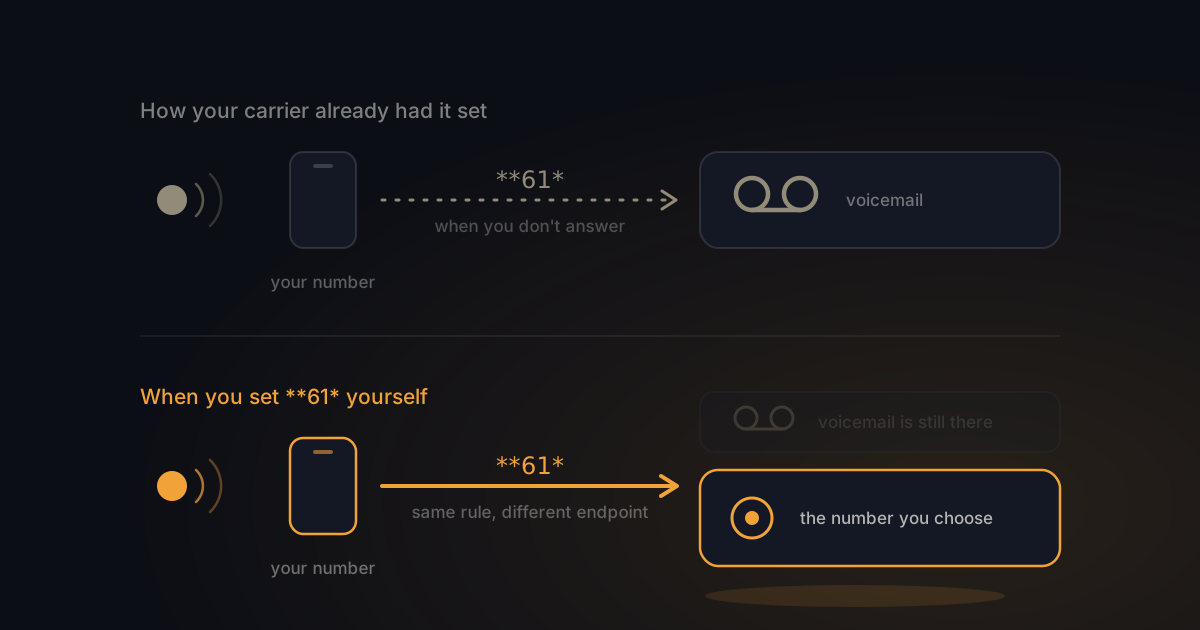
Want voicemail back? Cancel your own rule with ##61# and the carrier default usually slots back in on its own. If it doesn’t, your carrier can reset it for you.
If you’d rather get rid of voicemail altogether, that’s a separate job depending on your carrier.
What does the caller notice?
Very little, which is the point.
Someone calling you hears your phone ring as normal, and after the delay you set, the call connects to the new number. There’s no announcement and no beep. Most callers have no idea anything was forwarded.
Whoever picks up usually sees the original caller’s number rather than yours — which helps, because they know who’s calling and can ring back directly.
The cost sits with you, not the caller. They pay what they’d normally pay to reach your number. The forwarded leg comes out of your plan.
So where should you forward calls to?
This is the question underneath all of it, and no carrier page answers it. Fair enough — they sell a network, not a destination.
Roughly four options. Your own voicemail, which works, except you’re then stuck listening back and hardly anyone leaves messages anymore. A colleague, which is fine until they’re busy too. An answering service, where a person picks up and you usually pay per call. Or something that turns the call into text for you.
That last one is what we do. You forward on no-answer, you keep your own number, and when you don’t pick up the message arrives within seconds as readable text in WhatsApp: a one-line summary at the top, the details pulled out, the full transcript, and a draft reply ready to send. You read who called and why in about ten seconds, and you respond when it suits you.
Which of the four fits depends on how often your phone rings and how personal it needs to be. We’ve put them side by side without the sales pitch.
Frequently asked questions
What is call forwarding?
Call forwarding sends incoming calls to another number instead of your own. It’s a network feature, so it works whether your phone is on or off, and it doesn’t depend on any app.
How do I turn off call forwarding?
Dial ##002# and press call. That cancels every forwarding rule at once. To switch off just one, use ##21#, ##61#, ##62# or ##67#.
How do I turn off call forwarding on an iPhone?
Settings → Apps → Phone → Call Forwarding, then flip the switch off. That only clears the always-forward rule. If calls are still being forwarded when you don’t answer, dial ##61# — that rule isn’t visible in iOS settings.
Does call forwarding cost money?
Turning it on is free. The forwarded call itself is billed to you as if you’d dialled that number yourself. Inside the EU there are no extra charges; outside it, roaming may apply.
Why isn’t my phone ringing anymore?
**21* is probably active instead of **61*. Check with *#21# and cancel it with ##21#.
Does call forwarding work when my phone is off?
Only **62*, the unreachable rule. **61* needs your phone to ring first, so it does nothing when the handset is switched off.
In short
**61*number#forwards calls you don’t answer.**21*number#forwards everything and stops your phone ringing.**61*number**20#sets how long your phone rings first — 5 to 30 seconds, in steps of 5.*#21#and*#61#show you what’s active right now. Check that first when something’s off.##002#cancels every forwarding rule at once.- Your voicemail is itself a call forward. Set your own and you take that slot over.
Forward your calls, and still know who rang. Switch BeepSweep on → You keep your own number, and missed calls arrive as text in WhatsApp. From €25 a month, with no per-call charges. Missed the call, not the message.