AI receptionist for HVAC and plumbing: what to check.
What an AI receptionist does with the calls an HVAC or plumbing company gets, what to verify before you sign, and the rules you have to set yourself.
You’re under a floor with both hands in a manifold. The phone in your chest pocket goes. You don’t pick up, because you can’t, and you couldn’t write anything down anyway.
Plenty of pages will tell you an AI receptionist answers that call around the clock. If you run a practice rather than a trade, a different set of rules applies. This one is about the questions that decide whether it works: what it asks, what happens when it’s wrong, and what you have to set before any of it means anything.
An AI receptionist set up only for breakdowns misses most of the traffic
Most calls to a service company aren’t about something being broken. Appointments, address changes, plan questions and quote requests make up the larger share.
What comes in on an ordinary day, in the caller’s own words:
- “The heating stopped working and I have no hot water”
- “There’s an error code on the display”
- “I have a leak”
- “I smell gas”
- “Can I move my appointment on Thursday?”
- “I’ve moved, does my plan come with me?”
- “When is my system due for service?”
- “What does a maintenance plan cost, and what’s in it?”
- “What does a new system cost?”
- “I want to file a complaint about the last visit”
- “Do you cover my area, and are you open Saturdays?”
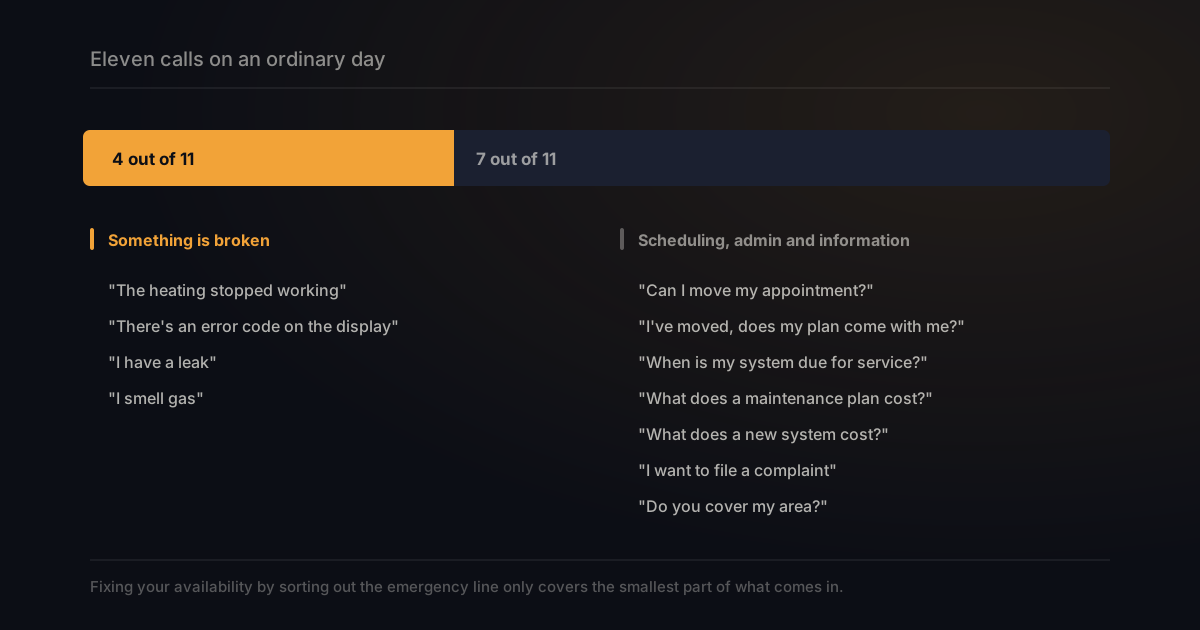
Four of those eleven are about something broken. Booking and dispatch are well covered by most tools. The admin half rarely gets mentioned at all, and it’s where a lot of the interruptions live.
Without the make, the error code and the age, “it stopped working” isn’t a job yet
A call is only useful with the make, the error code, the age and the address attached. Without those you call back.
Good tools ask exactly this: what type of system, how old, what the display shows, what the symptoms are, whether there’s water or ice. Ask any provider to show you their actual question set before you sign, not a description of it.
The difference is what you’re left holding. A missed call gives you a number. A call that was asked through gives you an address, a make, a code and a time when someone is home.
An AI receptionist can factor in whether someone is on a plan
Whether a caller is on a maintenance plan usually decides how fast they get help. An AI receptionist can ask and act on it.
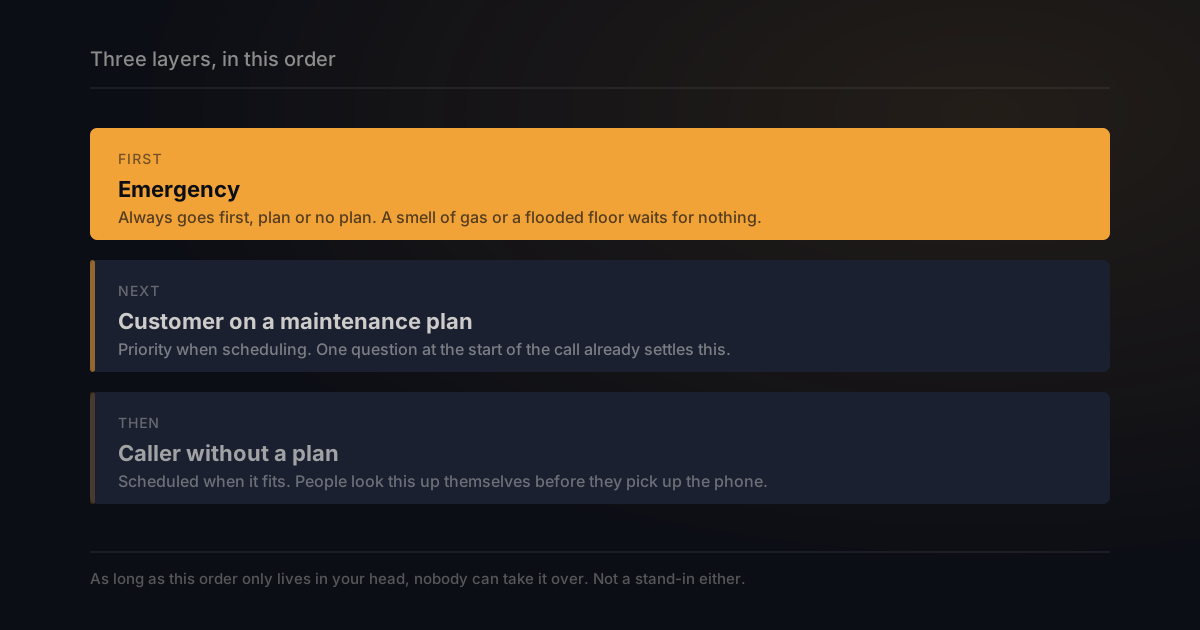
Plan customers generally get priority. Everyone else gets scheduled when it fits. That only works if you know at the start of the call which one you’re talking to. On the phone that’s one question. With a missed call you find out when you call back.
”I smell gas” should be transferred, not summarised
A gas smell doesn’t belong in a message. This is the call that has to reach a person straight away.
It’s also the one category where the plan doesn’t count. A suspected leak goes first, customer or not.
Two things follow. Transferring isn’t a nice extra, it’s a requirement. And you decide in advance which words trigger it. A system that can only take notes is the wrong tool here.
In the EU it has to say it’s an AI, and that changes your greeting
Since 2 August 2026, an AI talking to someone in the EU has to say so. That duty sits with the provider, not you.
The text is article 50 of the European AI Act. It says people have to be informed they’re interacting with an AI, unless that’s obvious to a reasonably observant person. A second paragraph adds that the notice has to be clear, distinguishable, and given at the latest at the first interaction. Halfway through the call is too late.
This matters even if you’re not in the EU. If you serve customers there, or you’re buying from a vendor that does, it’s worth asking how their greeting is worded. A tool sold on the promise that callers won’t notice is selling you the one thing the rule rules out.
A phone menu makes the caller choose, an AI receptionist just asks
A phone menu only works if the caller knows which box they belong in. An AI receptionist asks an open question instead.
Someone calling because they moved and also has a question about an invoice fits no menu. Press 1 for service and press 2 for scheduling forces people into a choice you designed. Why menus break down is covered in our piece on press 1, press 2.
An AI receptionist is only as good as the rules you give it
An AI receptionist without rules falls back on generalities. You set what counts as an emergency, what a non-plan caller gets, and where knowledge lives.
The first one is harder than it sounds. For most companies urgency is a feeling that shifts with how full the schedule is. A gas smell is always immediate. But does that hold for a leak you can shut off, or a family with no heat in November? As long as that judgement only lives in your head, nobody can take it over. Not a stand-in either.
The third gets forgotten most. A knowledge base filled from your website is exactly as good as that website. If your hours are wrong there, they’ll be wrong on the phone.
Setting this up is usually quoted as under an hour. Writing down the emergency rule honestly takes longer than the software does.
How to be sure an address and an appointment are right
Ask whether it reads the address and appointment time back to the caller. That is where a mistake gets corrected on the spot.
This is the question most product pages skip, and it’s the one that decides whether you drive to the wrong street. Three things worth asking before you commit:
- Does it read key details back? An address that gets repeated is fixed on the spot.
- Do you get the transcript and the recording? If you’re unsure about a house number, you replay that one stretch.
- Does the caller get a confirmation? An appointment confirmed by message is something the customer can check.
Ask the fourth question too: what happens when it doesn’t understand. There should be a real answer, a transfer to a person, a callback request, or a message that reaches you. Not every provider describes one.
Read the numbers in this market with some suspicion
Figures get quoted freely here and almost none of them come with a source. Missed-call percentages, average job values, monthly revenue recovered.
You’ll see claims that a large share of calls go unanswered in peak season, that most customers hire whoever answers first, and that a tool adds tens of thousands a month. They may be roughly true. What’s missing is who measured it, on how many companies, and over what period.
Ask for the study. If a number matters enough to base a decision on, it matters enough to have a source. The same goes for accuracy claims: a percentage without a method behind it is a marketing figure.
A call in text is something the rest of your process can use
A call that arrives as text isn’t a phone call any more, it’s a record. The rest of your business can act on a record.
A phone call disappears the moment you hang up. A message with fixed fields stays: who called, about what, how urgent, and when they’re reachable. A job can land with the right person instead of whoever answered. Recurring questions become visible once they pile up, and what gets asked often can go on your site.
Having a person answer runs $400 to $1,500 a month
A traditional answering service charges $400 to $1,500 a month, or $0.75 to $2.00 per minute. That is the comparison that matters.
Two things those figures hide. Per-minute pricing that looks cheap in March gets expensive in July, because peak season is when the volume arrives. And a human service usually adds a surcharge for evenings and weekends, which is exactly when an emergency line earns its keep.
Software prices are all over the place, and some providers publish none at all. So don’t ask for the entry rate. Ask what the bill looks like in your busiest month, and what happens when you go over the allowance.
What the four pricing models mean when the bill arrives is broken down in what an AI receptionist costs per month.
How BeepSweep does it
Our AI receptionist is called Sweep. It picks up, says it is an AI, asks who is calling and why, and sends a briefing.
That briefing has a one-sentence summary, the details pulled out, the transcript, the recording and a draft reply, over WhatsApp or email. Transferring to your mobile works, so a gas smell doesn’t have to end up in your inbox.
On the question above about confirmations: once an appointment or an order is booked, Sweep can message the caller about it, so they can read it back and catch anything wrong. That gets set up per business.
The Business plan adds a knowledge base filled from your own website, plus opening hours and routing rules. Enterprise gives every team member their own line and inbox. Putting appointments straight into your calendar works too.
What it costs: the free plan turns 15 missed calls a month into text, no credit card. Sweep itself starts at €6.99 a month for one person. Business is €29 and adds the knowledge base, opening hours and routing rules. Enterprise is €49 plus €15 per colleague, with a separate line and inbox for each. No per-call charges on any plan, so a busy week costs the same as a quiet one.
Two things we don’t do. Sweep doesn’t connect to field service software, so work orders won’t land in the system where you manage your installations. And BeepSweep currently operates in the Netherlands. If you’re running a contracting business in the United States, the tools built for that market will fit you better than we will.
You keep your own number. Forwarding on no answer takes about two minutes to switch on. How those codes work is in our piece on call forwarding. Hosted in Amsterdam, encrypted with AES-256, and calls are never used to train models.
Frequently asked questions
Does an AI receptionist have to say it’s an AI?
In the EU, yes, since 2 August 2026. Outside the EU it depends on local rules, but the greeting is worth checking either way.
Can it transfer to whoever is on call?
That varies by provider, and for emergencies it’s the first thing to ask. A system that can only take notes is the wrong tool for a gas smell or a flood.
What happens if it doesn’t understand a question?
There should be a fallback: a transfer, a callback request, or a note that reaches you. Ask about it, because not every provider describes one.
Does it work outside office hours?
Yes. Software doesn’t keep working hours. Opening hours are something you set.
Will my customer notice it isn’t a person?
Usually, after a few sentences. In the EU that’s nothing to hide either: it belongs at the start of the call.
In short
- Most calls aren’t about a breakdown. Booking and dispatch are well covered by most tools; the admin half rarely is.
- A call is only useful with the make, the error code, the system age and the address attached.
- Whether someone is on a plan usually decides how fast they get help. For a suspected gas leak it doesn’t count.
- In the EU an AI has to say so at the latest at first contact. A tool sold on callers not noticing is selling the one thing the rule rules out.
- Ask whether details get read back, and what happens when it doesn’t understand. Most product pages skip both.
- Ask for the source behind any number you’re quoted. Almost none of them come with one.
Curious what’s left of a missed call? Try BeepSweep free → You keep your own number, and missed calls arrive as readable text in WhatsApp. Free up to 15 messages a month. Missed the call, not the message.